
Sensitivities
Which variable appears to be the most important?
The significance of a variable for a response can be illustrated with ANOVA (analysis of variance) or GSA/Sobol (global sensitivity analysis).


New Plot
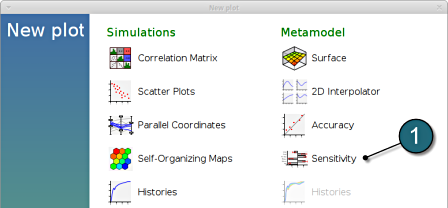
- To view a new plot select the plot button on the task bar. A seperate window of LS-OPT Viewer opens up.
LS-OPT Viewer
ANOVA
- Restart the LS-OPT Viewer and select under Metamodel the item Sensitivity
- We can slide to observe the sensitivity of results at each iteration. In this case for Iteration 1, since this is the only iteration that uses the whole design space.
- Select Linear ANOVA in the new window.
- From Response select F1_1.
- The user has the choice to Sort the plot by selecting the checkbox in the setup menu (default).
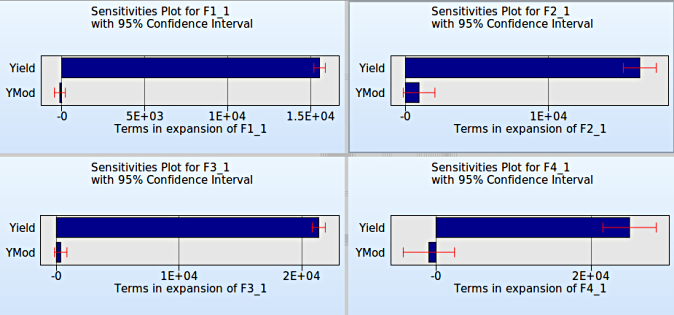
- To compare multiple plots for sensitivities of the input variables Yield and YMod on the various responses F2_1, F3_1 and F4_1, the user can select the split option at the task bar and repeat the previous steps.
→ It is clearly evident that the variable Yield is more sensitive compared to the variable YMod for all the responses.
→ Observe : The main objective of the problem description; viz. MSE is not available in the options list because ANOVA measure is not computed for composites.
GSA/Sobol
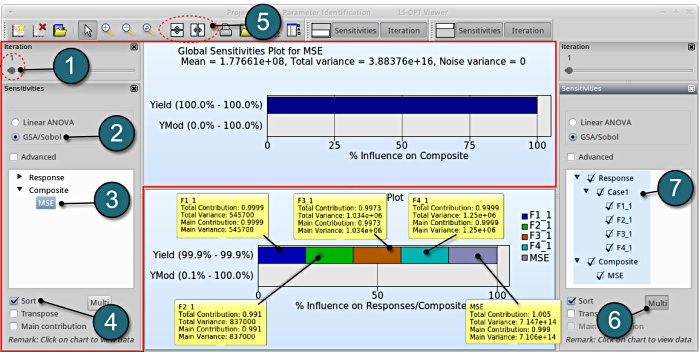
- We can slide to observe the sensitivity of results at each iteration. In this case for Iteration 1, since this is the only iteration that uses the whole design space.
- Select GSA/Sobol in the new window.
- From Composite select MSE.
- The user has the choice to Sort the plot by selecting the checkbox in the setup menu (default).
- To compare multiple plots for sensitivities of the input variables Yield and YMod on the various entries, the user can select the split option at the task bar and repeat the previous steps.
- The viewer allows the user to select multiple responses for sensitivity analysis to get the influence of the variables on e.g. the whole problem or a load case using the following steps:
- Create a new plot area similar to step 5. Then select the option Multi.
- Select the necessary responses or MSE. In this case selections made are the responses and MSE.
- The plot describes the cumulative plot on a single graph w.r.t. the variables. This is only availabe for GSA, not for ANOVA, since GSA values are normalized.
Comparision of ANOVA and GSA/Sobol
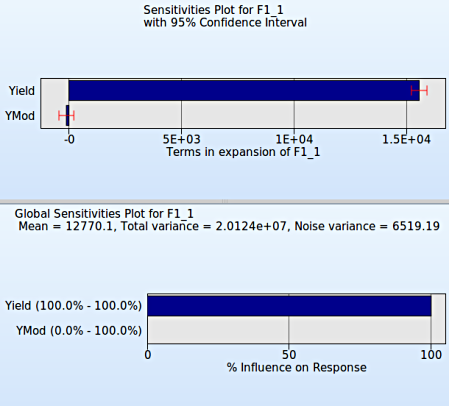
ANOVA is a linear sensitivity measure, whereas GSA is a nonlinear sensitivity measure. Both are evaluated on the metamodel. Since linear metamodels are used here, the variable ranking is the same for both sensitivity measures.